SpeedoOneHR Sia AI

SpeedoOne for
Human Resources

SpeedoOne gives your organization a comprehensive set of tools to find new talent and empower employees.

Watch a video
Recruitment

Find and hire
the right people

Post openings, turn incoming resumes into searchable records, run interviews and send signed offer letters without leaving SpeedoOne.

Fill Openings

Create openings and post them to job boards.

Watch a video

Resume Parsing

Automatically turn submitted resumes into searchable candidate records.

Watch a video

Interviews

Schedule interviews with candidates and hiring managers.

Learn more

Create Offer Letters

Create and send offer letters for digital signatures.

Learn more

One HR workspace

Everything HR Needs. In One Place.

From employee information and attendance to everyday HR workflows, SpeedoOne helps bring your people processes together in one centralized workspace.

Employee Management

Keep employee information organized and accessible.

01

Attendance

Track attendance and workforce presence efficiently.

02

Leave Management

Manage leave requests, approvals and employee availability.

03

Employee Self-Service

Give employees easy access to their HR-related information and requests where supported.

04

HR Workflows

Reduce repetitive HR work with structured digital processes.

05

HR Reports

Get visibility into important workforce information and activities.

06

Employee management

Your People. One Organized Workspace.

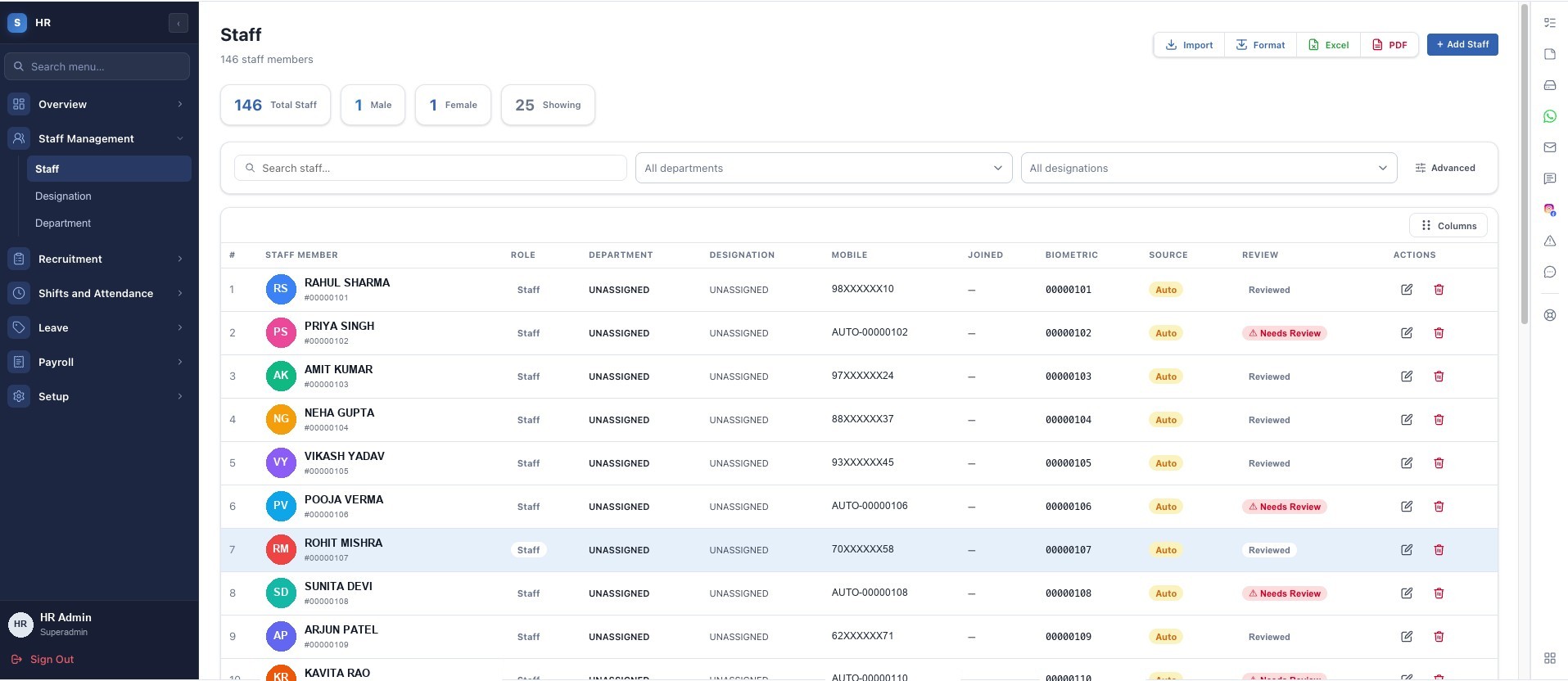
Keep employee information centralized so HR teams can spend less time searching for records and more time supporting employees.

  • Employee profiles
  • Departments
  • Designations
  • Contact information
  • Employment information
  • Documents
  • Employee activity
Rahul Sharma Software Engineer · Engineering Active
Employee IDEMP-1042
Joining Date04 Feb 2024
DepartmentEngineering
ManagerA. Nair
DesignationSoftware Engineer
Work LocationHead Office
  • Checked in at 09:12
  • ID proof uploaded to profile
  • Casual leave approved

Employee names and records shown here are fictional examples created for this page. No real personal information is used.

Attendance

Attendance Made Simple.

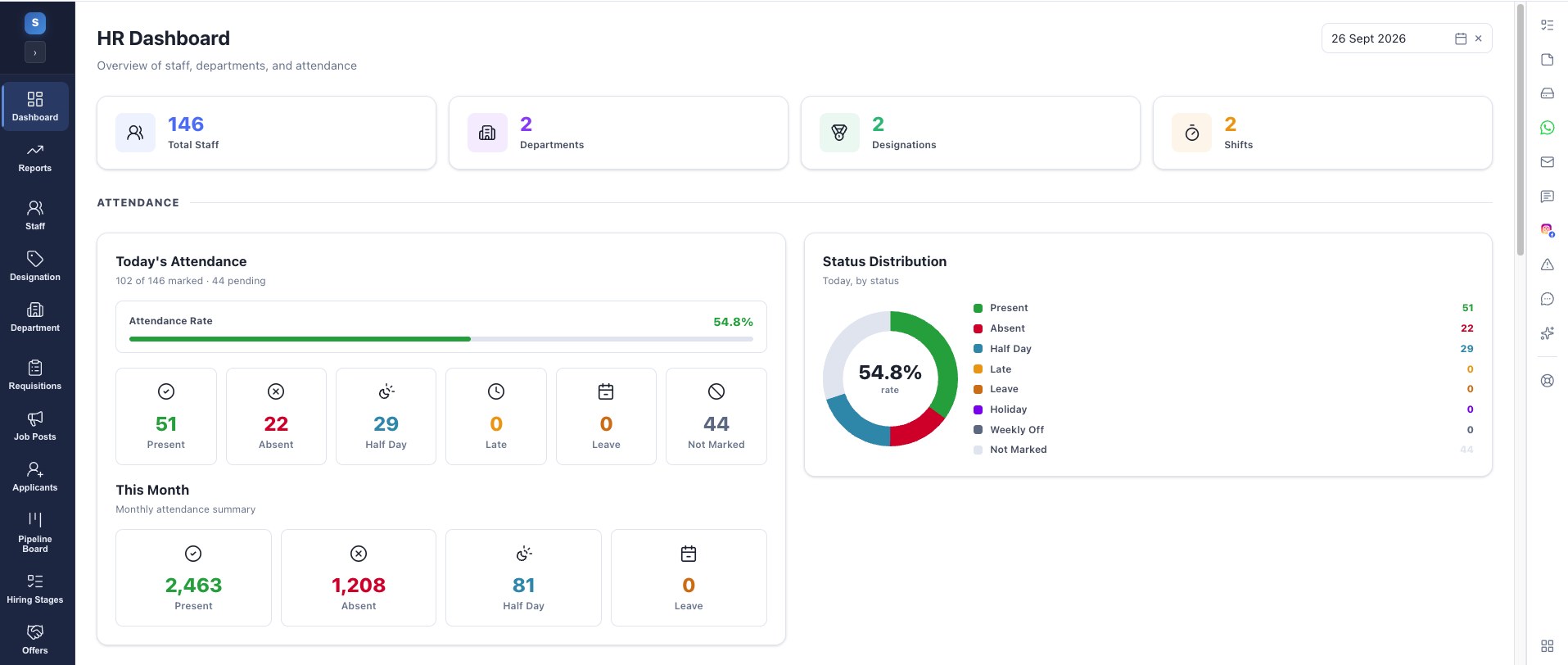
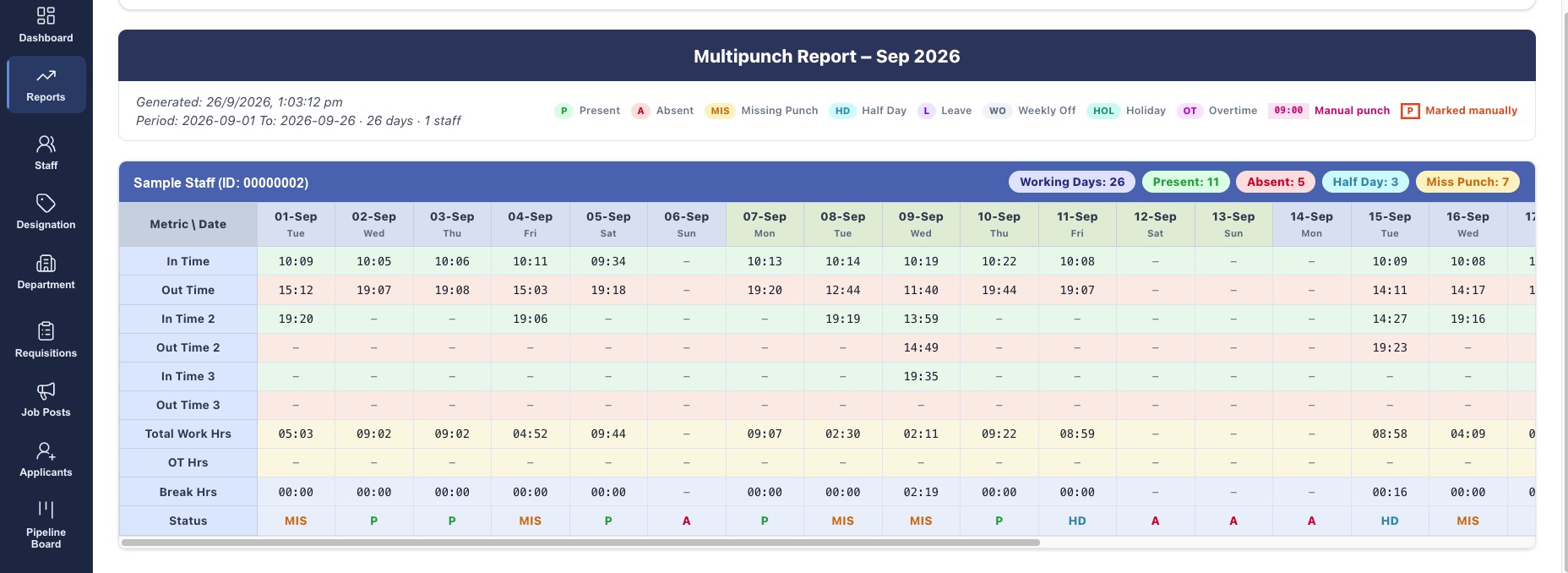
Get a clear view of workforce attendance and daily presence.

SpeedoOne

Attendance

Daily presence across the organization

Example data
Present 226Checked in today
Absent 8No check-in recorded
Late 12After shift start
On Leave 14Approved leave
Attendance registerExample data
Example attendance register for the current day
EmployeeDepartmentCheck-inCheck-outStatus
Rahul SharmaEngineering09:1218:34Present
Priya SinghOperationsOn Leave
Imran QureshiSales09:4818:22Late
Neha PatelSupport08:5717:59Present
Arjun MenonFinanceAbsent
Sara ThomasEngineering09:0418:41Present
Example weekly attendance summary
DayPresentAbsentLateOn Leave
Monday2316911
Tuesday22871413
Wednesday22681214
Thursday2335710
Friday21991620
Example monthly attendance summary
WeekWorking daysAvg. presentLeave daysAttendance rate
Week 152295892%
Week 252344994%
Week 352276391%
Week 442363795%
Example attendance summary by department
DepartmentEmployeesPresentOn LeaveStatus
Engineering72683Healthy
Operations54494Healthy
Sales41354Watch
Support33312Healthy
Finance18171Healthy
Leave requests Pending first
Priya SinghOperations · EMP-1188 Pending
Leave TypeCasual Leave
From12 Aug
To14 Aug

Family commitment. Handover shared with the operations team lead.

Imran QureshiSales · EMP-0937 Approved
Leave TypeSick Leave
From05 Aug
To06 Aug

Leave management

Leave Requests Without the Paperwork.

Simplify leave requests and approvals while keeping employee availability visible to HR and managers.

  • Request in a few taps
  • Approve or reject
  • Team availability
  • Decision history

The approve and reject buttons on this page are an interface demonstration only. They do not create or change any record.

Employee self-service

Give Employees More Control.

Let employees access relevant information and complete everyday HR requests without depending on HR for every small task.

SpeedoOne

My HR

Rahul Sharma · Engineering

Employee view
My ProfilePersonal and job information
AttendanceOwn check-in history
LeaveBalance and past leave
RequestsRaise and track requests
DocumentsShared HR documents
TasksWork assigned to me
AnnouncementsCompany updates
Ask HRReach the HR team
My attendance this monthExample data
My requests
  • Casual leave · 2 days
  • Employment letter request
  • Address proof uploaded

Self-service modules are enabled per organization. What an employee can see and do is controlled by their role and permissions.

HR workflows

Automate the Routine. Focus on People.

Reduce repetitive administrative work by digitizing everyday HR processes.

Employee requestFrom submission to notification
1Employee RequestSelf-service
2HR WorkflowRouted
3Manager ApprovalDecision
4HR UpdateRecord
5Employee NotificationClosed
New joiner setupBuilt from employee, document and task modules
1New EmployeeAdded
2Employee ProfileDetails
3DocumentsAttached
4Onboarding TasksAssigned
5Employee ActiveReady

New joiner setup is run using the employee, document and task modules that already exist in SpeedoOne. SpeedoOne does not currently provide recruitment or applicant tracking, and payroll processing is not part of the HR module.

Employee data

One Source of Truth for Employee Information.

Keep important employee information organized in a centralized HR workspace with appropriate access controls.

  • Employee Profile
  • Personal Information
  • Job Information
  • Attendance
  • Leave
  • Documents
  • Activity
Neha Patel Support Specialist · Support Active
Employee IDEMP-1327
DesignationSupport Specialist
DepartmentSupport
ManagerD. Iyer
Joining Date18 Sep 2023
Employment TypeFull time
Work Emailneha.p@example.com
Work Phone+91 90000 00000
LocationHead Office
Emergency ContactOn file

Sensitive fields are visible only to users whose role allows it.

Present days19This month
Late marks2This month
Leave taken3This year
Open requests1Awaiting action
  • Checked in at 08:57
  • Leave request submitted
  • Certificate added to profile
  • Department updated by HR

HR reports

Understand Your Workforce Better.

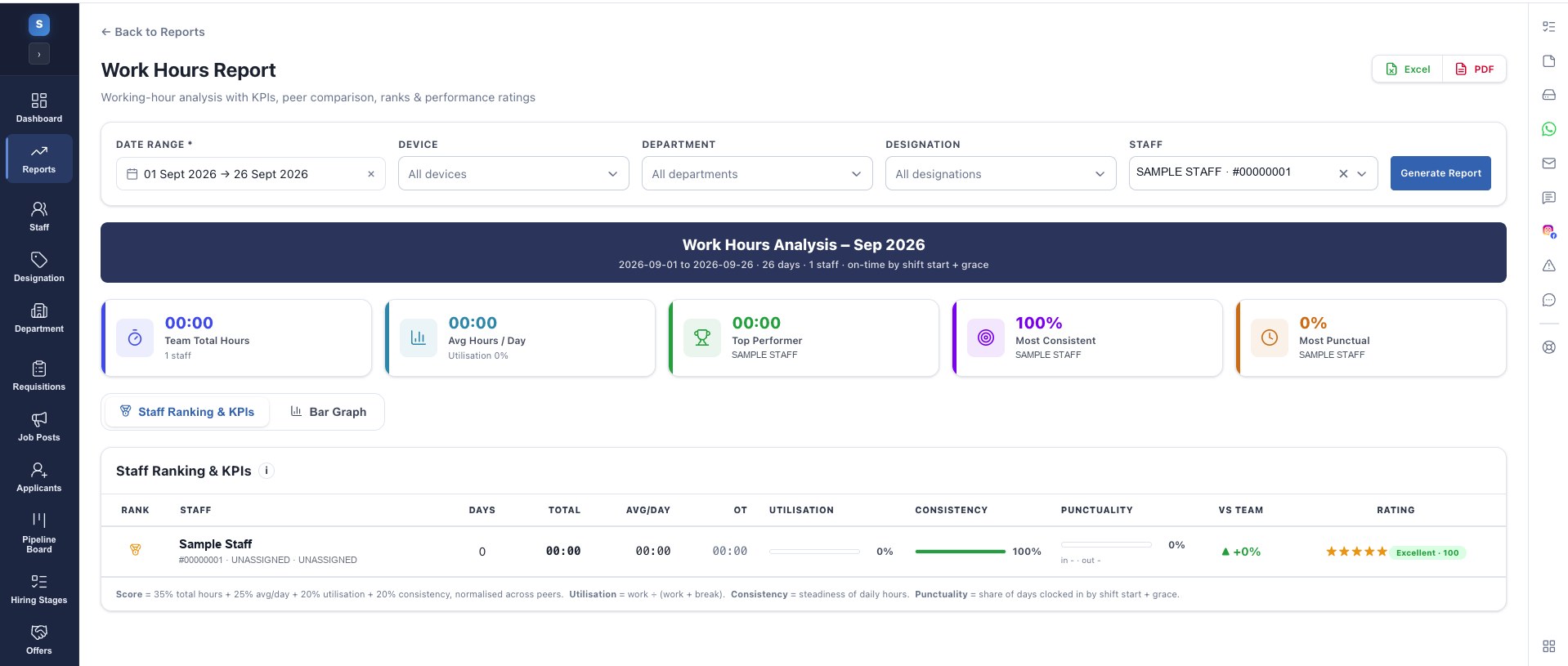
Bring headcount, attendance and leave information into one view so HR decisions start from facts instead of scattered spreadsheets.

SpeedoOne

Workforce overview

Headcount, attendance and leave activity

Example data
Total Employees 248Across 9 departments
Active Employees 241Currently active
Attendance Rate 94%This month
Pending Requests 8Awaiting action
Attendance trend12 weeks
Employee distribution
  • Engineering 29%
  • Operations 22%
  • Sales 17%
  • Support 13%
  • Other 19%
Leave trend6 months
Department overview
  • Engineering72
  • Operations54
  • Sales41
  • Support33
  • Finance18
Workforce activityLive
  • 2 leave requests approved
  • 1 employee added to Operations
  • 6 documents uploaded
Announcements All employees
Company Update

“Office timings will change from Monday.”

All departments Published
Policy Note

“The updated leave policy is now available under HR documents.”

Linked document
Reminder

“Please complete your pending profile details this week.”

Employee action

HR communication

Keep Your Employees Connected.

Send the message once, in the same place people already check their attendance and requests, instead of chasing it across chat groups and notice boards.

  • Announcements
  • Notifications
  • Internal communication
  • Employee updates
  • Feedback

Employee feedback is collected with the SpeedoOne Feedback & Ratings and Forms modules, and wider messaging uses Team Inbox and WhatsApp where those applications are enabled for your organization.

HR documents

Keep Important HR Documents Organized.

Store HR files where the employee record already lives, so the right document is one click from the person it belongs to.

  • Employee Documents
  • Policies
  • Forms
  • Certificates
  • HR Records

HR documents are stored using SpeedoOne Drive, so the same access rules and folder structure apply across the platform.

HR / Documents Example data
Employee Documents248 files
Policies12 files
Forms9 files
Certificates36 files
HR Records74 files
Departments9 folders
  • Leave Policy 2026.pdfUpdated 2 days ago
  • Employee Information Form.pdfUpdated last week
  • EMP-1042 · ID Proof.pdfRestricted
  • EMP-1327 · Certificate.pdfRestricted

HR processes

Build Better HR Processes.

SpeedoOne HR focuses on the processes teams run every day. Instead of promising a module that does not exist yet, it makes the existing ones dependable — records that stay current, requests that reach the right person and information HR can act on.

Accurate records

One employee record that HR, managers and the employee all work from, so information does not drift between copies.

Clear request paths

Every leave or HR request follows a defined route to the right approver, with the decision recorded against the employee.

Information HR can use

Attendance, leave and headcount in one view, so reviews start from the same set of facts across departments.

Performance reviews, goal tracking and appraisal cycles are not part of SpeedoOne HR today. If those are on your requirement list, talk to our team about where they sit on the roadmap rather than assuming they ship with the module.

Mobile HR

HR Wherever Your Team Works.

Field staff, shift teams and travelling employees do not sit at a desk. SpeedoOne HR works in the browser on a phone, so attendance, leave and profile details stay reachable from wherever the work happens.

  • Attendance
  • Leave Request
  • Employee Profile
  • Notifications

Why SpeedoOne HR

Why SpeedoOne HR?

Five reasons HR teams move their people processes onto one platform.

Centralized HR

Keep important employee information in one place.

01

Less Manual Work

Digitize repetitive HR processes.

02

Better Employee Experience

Make everyday HR interactions easier.

03

Better Visibility

Give HR teams clearer information about workforce activities.

04

Scalable

Build an HR environment that can grow with your organization.

05

The HR ecosystem

One HR Core. Nine Connected Modules.

Every part of SpeedoOne HR works off the same employee record, so a change in one module is reflected everywhere it matters.

SpeedoOne HR People core
Employees Attendance Leave Requests Documents Tasks Communication Reports Automation

Connected platform

HR Doesn’t Work Alone.

An employee record is rarely only an HR concern. On SpeedoOne, HR shares the same login and user directory as the rest of the platform, so people information reaches the applications that need it.

Tasks WhatsApp Drive Accounting GPS Energy

Connect with SpeedoOne applications where supported. Which applications are available to your organization depends on your plan and configuration — our team will confirm the exact set before you commit.

1HREmployee record
2TasksWork assigned
3DriveHR documents
4WhatsAppReach staff
5ReportsVisibility

See every SpeedoOne application

SpeedoOne HR

Make HR Simpler for Everyone.

Bring employee management, HR workflows and workforce visibility together with SpeedoOne.

Talk to our team about which HR modules fit your organization.

FAQ

HR Questions, Answered.

The questions organizations ask most when they evaluate SpeedoOne HR.

What is SpeedoOne HR?
SpeedoOne HR is the people module of the SpeedoOne platform. It gives HR teams one centralized workspace for employee information, departments, attendance, leave requests, HR documents and everyday HR processes — using the same login and user directory as the rest of SpeedoOne.
What can I manage with SpeedoOne HR?
Employee profiles and employment information, departments and designations, daily attendance, leave requests and approvals, HR documents, announcements and employee activity — along with reports built on that information. Feature availability depends on your plan and configuration.
Can employees access their own information?
Yes, where employee self-service is enabled for your organization. Employees sign in to see their own profile, attendance, leave balance and requests, assigned tasks, shared documents and announcements — without contacting HR for every routine request. What each person can see is controlled by their role and permissions.
Can I manage attendance?
Yes. SpeedoOne HR records daily attendance and presence so HR and managers can see who is present, absent, late or on leave, review check-in and check-out details, and filter the view by day, week, month or department.
Can employees submit leave requests?
Yes. An employee submits a request with the leave type and dates, it goes to the right approver, and the decision is recorded against the employee — so availability stays visible to HR and managers instead of living in an email thread.
Can HR automate repetitive processes?
Routine HR steps can be digitized instead of handled over email and paper: requests follow a defined path to the right approver, decisions update the employee record, and the people involved are notified. New joiner setup runs the same way — onboarding steps as SpeedoOne tasks, with documents attached to the employee profile.
Can HR generate reports?
Yes. Because employee, attendance and leave information sits in one place, HR can review workforce numbers, attendance and leave activity, and department-level distribution — instead of rebuilding the same picture in spreadsheets every month.
Is SpeedoOne HR suitable for small and large organizations?
Yes. A small team can start with employee records, attendance and leave alone. Larger organizations add departments, designations, self-service, documents and reporting, then connect HR to other SpeedoOne applications as they grow. The same platform and the same login covers both.

Still have a question? Talk to our team